Traffic · 12 min read · May 19, 2026
GA4 vs Universal Analytics: The Complete Migration Guide for Marketers
Side-by-side comparison of GA4 and UA reporting models, event tracking differences, and how to rebuild your most important dashboards in the new paradigm.
GA4 vs Universal Analytics: The Complete Migration Guide for Marketers
The landscape of digital analytics has undergone a significant transformation, necessitating a strategic shift for marketers accustomed to established methodologies. The transition from Universal Analytics (UA) to Google Analytics 4 (GA4) represents more than just an update; it's a fundamental reimagining of how user behavior is tracked, measured, and interpreted. This guide provides a comprehensive comparison of GA4 and Universal Analytics, detailing their distinct reporting models, event tracking paradigms, and offering practical advice on how to effectively rebuild your most critical dashboards within this new analytics framework. Understanding these differences is paramount for any business aiming to maintain robust data-driven decision-making capabilities in an evolving digital ecosystem.
Key Differences Between Universal Analytics and GA4
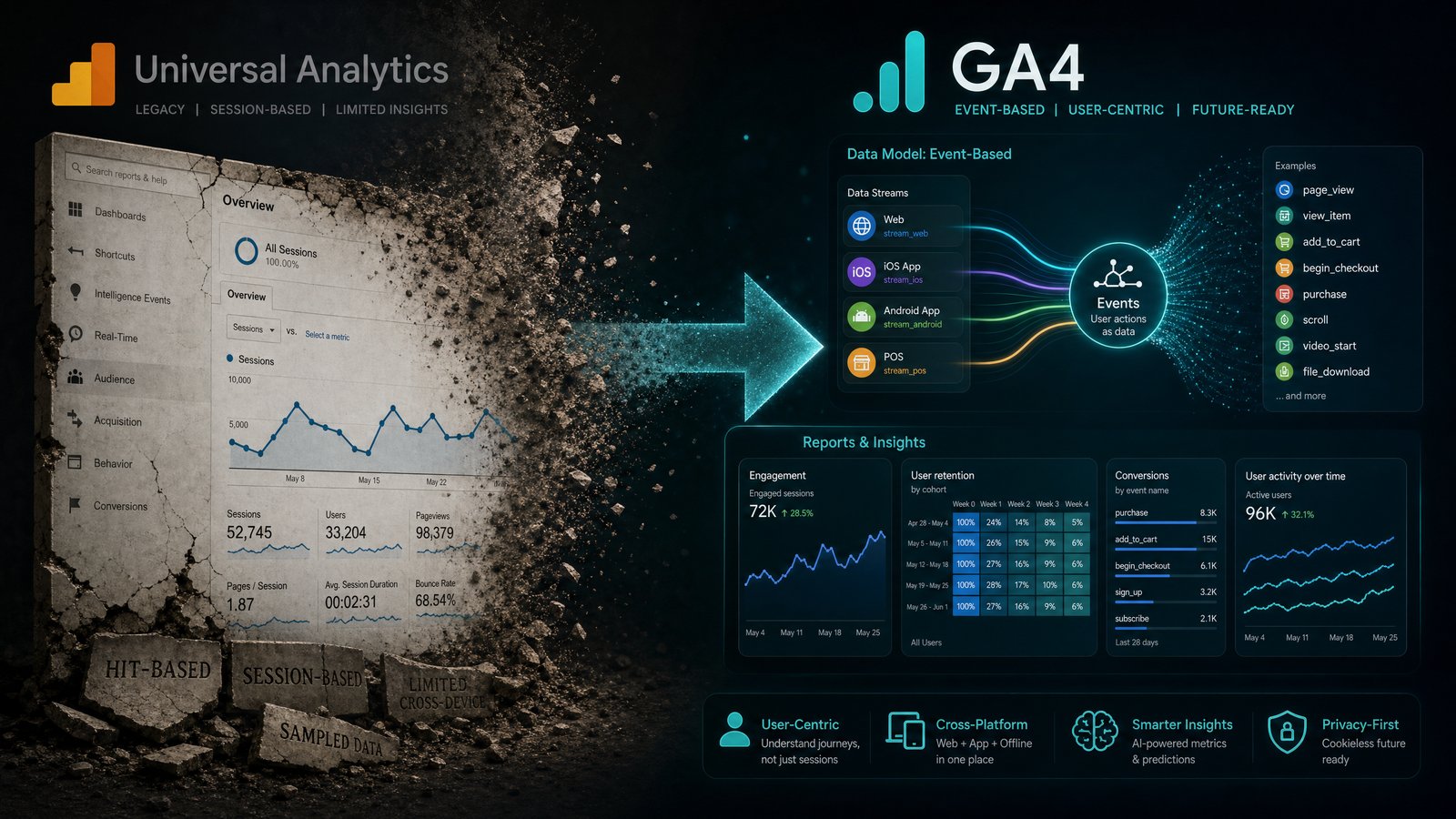
The divergence between Universal Analytics and GA4 stems from their foundational data models, which in turn influence every aspect of data collection, processing, and reporting. While UA was built around sessions and pageviews, GA4 adopts an event-centric approach, offering a more flexible and future-proof method for understanding user journeys across various platforms.
Data Model: Sessions vs. Events
Universal Analytics primarily operates on a session-based model, where interactions are grouped into sessions, and metrics like pageviews, bounce rate, and session duration are central. This model, while effective for website-centric analysis, struggles to provide a unified view of users across different devices and platforms. GA4, conversely, is built on an event-driven data model. Every user interaction, from a pageview to a click, a video play, or a purchase, is considered an event. This unified approach allows for a more holistic understanding of the customer journey, enabling cross-platform analysis and a more granular view of engagement. This fundamental shift in the data model is a critical aspect of the GA4 vs Universal Analytics migration.
Reporting Interface and Capabilities
The reporting interfaces of UA and GA4 present distinct philosophies. Universal Analytics offers a wide array of pre-configured reports, often organized by acquisition, behavior, and conversion. While customizable, its structure can sometimes feel rigid for complex, multi-platform analysis. GA4 introduces a more flexible and customizable reporting experience, emphasizing exploration and predictive capabilities. Its 'Explorations' section allows for ad-hoc analysis, funnel exploration, and path analysis, providing deeper insights into user behavior. The standard reports are streamlined, focusing on key lifecycle stages, and are designed to be more intuitive for understanding user engagement across web and app properties. Marketers will find that adapting to these new GA4 reporting models requires a shift in analytical mindset.
Event Tracking and Measurement
One of the most significant enhancements in GA4 is its approach to event tracking. In Universal Analytics, event tracking required specific configurations for categories, actions, and labels, often necessitating custom code. GA4 simplifies this with automatic event tracking for many common interactions (e.g., scrolls, outbound clicks, video engagement) and a more intuitive framework for custom events. This streamlined approach to event tracking differences means that marketers can capture a richer dataset with less development effort, focusing on what truly matters for their business objectives. The flexibility of GA4's event parameters also allows for more detailed data collection, providing context to each interaction.
User Identification and Privacy
GA4 is designed with a stronger emphasis on user privacy and future-proofing against evolving data regulations. While Universal Analytics relied heavily on cookies, GA4 employs a more robust, multi-faceted approach to user identification, utilizing User-ID, Google signals, and device ID. This allows for more accurate de-duplicated user counts and a more comprehensive view of individual user journeys across devices. Furthermore, GA4 incorporates machine learning to fill data gaps where user consent or technical limitations prevent direct observation, offering a more resilient measurement solution in a privacy-first world.
Planning Your Migration to GA4
A successful migration from Universal Analytics to GA4 requires careful planning and execution. It's not merely a technical task but a strategic opportunity to redefine your analytics strategy and gain deeper insights into your customer base.
Setting Up Your GA4 Property
The initial step in the GA4 vs Universal Analytics migration is to set up a new GA4 property alongside your existing UA property. This dual-tagging strategy allows for parallel data collection, ensuring no data loss and providing a period for familiarization and validation. Begin by creating a new GA4 property in your Google Analytics account. Implement the GA4 configuration tag on your website, either directly or via Google Tag Manager. Focus on defining your key events and conversions early in this process, as the event-driven model of GA4 necessitates a clear understanding of what actions constitute valuable user engagement for your business.
Replicating Key Metrics and Dimensions
One of the common challenges in migrating is ensuring that you can still track and report on the metrics and dimensions critical to your business. While some UA metrics have direct GA4 equivalents, others require a different approach. For instance, 'bounce rate' in UA is replaced by 'engagement rate' in GA4, reflecting a more nuanced view of user interaction. Take an inventory of your most important UA metrics and dimensions, and then map them to their GA4 counterparts or identify how to recreate them using GA4's event parameters and custom definitions. This mapping exercise is crucial for maintaining continuity in your reporting and analysis.
Rebuilding Essential Dashboards
Rebuilding your essential dashboards in GA4 is a pivotal step in the migration process. Given the differences in data models and reporting interfaces, a direct replication of UA dashboards is often not feasible or optimal. Instead, leverage GA4's 'Explorations' and custom reporting features to rebuild essential dashboards that align with the new event-centric paradigm. Focus on key performance indicators (KPIs) that reflect user engagement, conversion paths, and customer lifecycle. Utilize the flexibility of GA4 to create custom reports that provide the specific insights your team needs, moving beyond the limitations of the old session-based reporting.
Best Practices for a Smooth Transition
Ensuring a seamless transition to GA4 involves more than just technical implementation; it requires a strategic approach to data validation, team training, and continuous optimization.
Dual Tagging Strategy
Employing a dual tagging strategy is highly recommended during the migration period. This involves running both your Universal Analytics and GA4 properties concurrently. This approach allows you to collect data in both systems simultaneously, providing a historical baseline in UA while building up data in GA4. It also offers a crucial period for data validation, allowing you to compare data points and ensure accuracy in your new GA4 setup. This parallel data collection is invaluable for identifying discrepancies and fine-tuning your GA4 configuration before fully transitioning.
Data Validation and Reconciliation
Thorough data validation and reconciliation are non-negotiable. After implementing GA4, regularly compare key metrics between your UA and GA4 properties. While exact parity is unlikely due to the differing data models, significant discrepancies should be investigated. Use GA4's DebugView to monitor events in real-time and ensure they are firing correctly. Create custom reports in both platforms to compare specific metrics and dimensions. This iterative process of validation helps build confidence in your GA4 data and ensures that your business decisions are based on accurate information.
Training and Adoption
The success of your GA4 migration ultimately hinges on user adoption. Provide comprehensive training for your marketing and analytics teams on the new GA4 interface, data model, and reporting capabilities. Emphasize the benefits of the event-driven approach and how it enables more powerful insights. Create internal documentation and resources to support ongoing learning. Encourage experimentation with GA4's exploration tools to foster a deeper understanding of user behavior. A well-informed and confident team is essential for maximizing the value derived from your new analytics platform.
Conclusion
The transition from Universal Analytics to GA4 is a critical step for any marketer seeking to future-proof their analytics strategy. By understanding the fundamental differences in data models, reporting, and event tracking, and by meticulously planning your migration, you can unlock a more powerful and flexible analytics platform. The ability to track comprehensive user journeys across devices and leverage advanced insights will empower your business to make more informed decisions. Embrace this evolution in digital measurement to gain a competitive edge. Already running GA4? Export your GA4 data and upload it to DawnPulse to get an AI-powered daily briefing on top of your analytics — anomaly detection, trend analysis, and plain-English recommendations on what to do next.