Revenue · 9 min read · May 19, 2026
From 2% to 8% Click Rate: How a Retailer Rebuilt Their Mailchimp Automation Sequences
A step-by-step case study of how a mid-size retailer diagnosed poor email performance using data analysis, rebuilt their automation sequences, and quadrupled click-through rates in 60 days.
From 2% to 8% Click Rate: How a Retailer Rebuilt Their Mailchimp Automation Sequences
In the competitive landscape of digital retail, email marketing remains a cornerstone for customer engagement and revenue generation. However, simply sending emails is not enough; their effectiveness hinges on strategic design, precise targeting, and continuous optimization. This case study delves into how a mid-size retailer, grappling with stagnant email performance, leveraged a data-driven approach to overhaul their Mailchimp automation sequences, ultimately quadrupling their click-through rates and significantly boosting their revenue.
The Problem: Stagnant Engagement and Missed Opportunities
The retailer in question faced a common challenge: a robust email list but underwhelming engagement. Their existing Mailchimp automation sequences, designed years prior, were yielding an average click-through rate (CTR) of just 2%. This low performance translated directly into missed sales opportunities and a suboptimal return on their email marketing investment. The team suspected issues with content relevance, timing, and segmentation, but lacked the granular insights to pinpoint the exact weaknesses within their extensive automation workflows.
Their primary concern was identifying which specific touchpoints in the customer journey were failing and why. Generic welcome series, abandoned cart reminders, and post-purchase follow-ups were all underperforming. Without a clear understanding of customer behavior within these sequences, any attempts at improvement felt like guesswork. The retailer needed a systematic way to analyze their email performance, understand user interactions, and identify actionable areas for improvement in their Mailchimp automation sequences.
The Approach: Data-Driven Diagnosis and Strategic Rebuilding
Recognizing the need for a more analytical approach, the retailer embarked on a comprehensive review of their email strategy. Their methodology involved three key phases:
Phase 1: Deep Dive into Existing Data
The first step was to extract and analyze historical data from their Mailchimp account, cross-referencing it with sales data. This involved looking beyond surface-level metrics to understand:
- Segment Performance: Which customer segments were receiving which emails, and how did their engagement differ?
- Content Effectiveness: Which subject lines, calls-to-action, and content blocks resonated most (or least) with recipients?
- Timing and Frequency: Were emails being sent at optimal times, and was the frequency overwhelming or insufficient?
- Conversion Paths: How did email clicks translate into actual purchases, and where were customers dropping off?
This initial analysis revealed critical insights. For instance, it became clear that their abandoned cart emails, while numerous, were too generic and lacked personalized product recommendations. Their welcome series was also too long and delivered irrelevant offers to new subscribers, leading to early disengagement. The data provided a clear roadmap for where to focus their rebuilding efforts for their Mailchimp automation sequences.
Phase 2: Rebuilding Mailchimp Automation Sequences
Armed with data-backed insights, the team began redesigning their Mailchimp automation sequences. This involved:
- Hyper-Segmentation: Instead of broad segments, they created more granular customer groups based on purchase history, browsing behavior, and engagement levels. This allowed for highly tailored messaging.
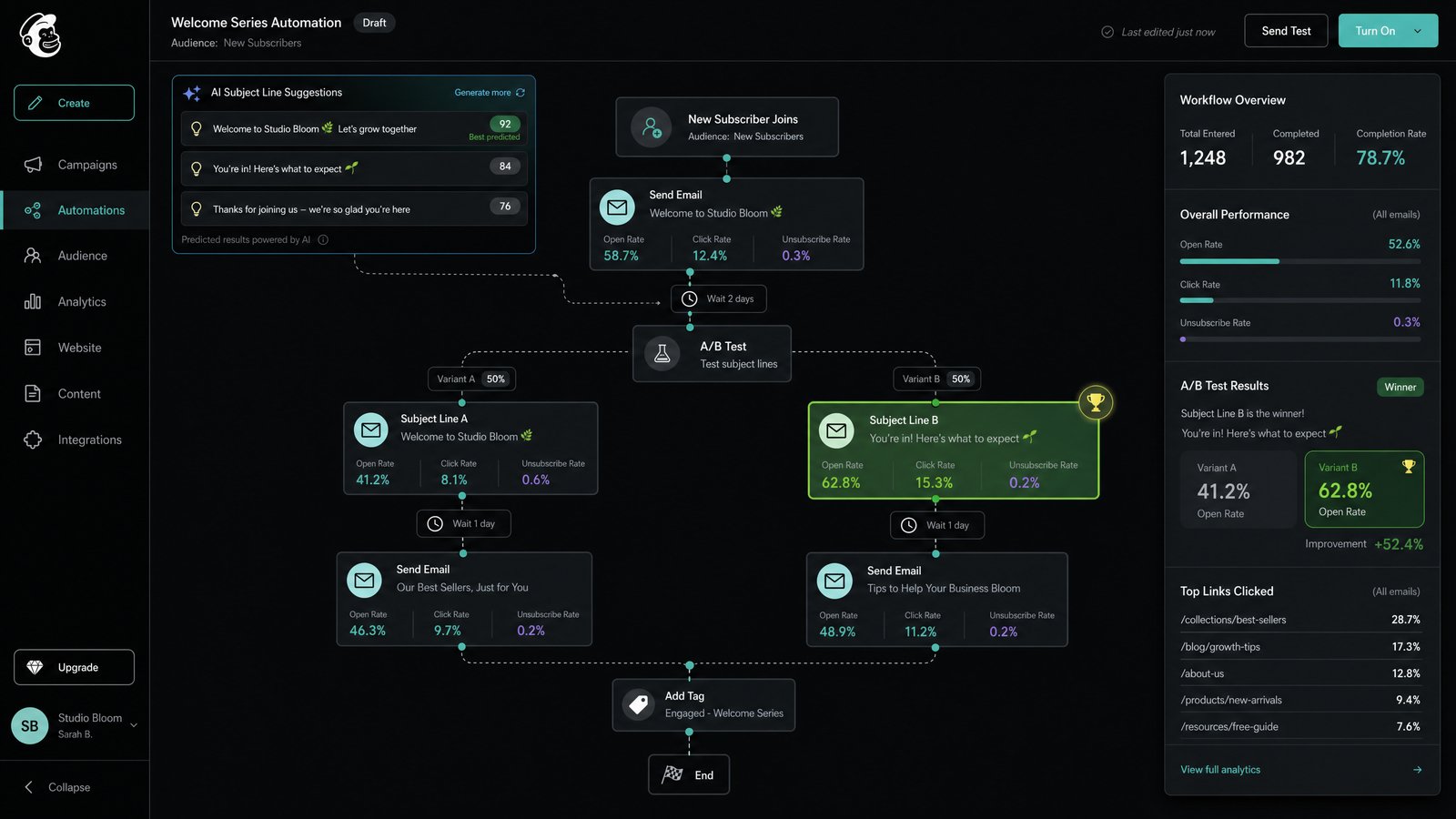
- Personalized Content: Abandoned cart emails were updated to dynamically pull in specific product images and related recommendations. Welcome series were shortened and diversified, offering different paths based on initial subscriber interests.
- Optimized Timing: A/B testing was conducted on send times for various automation steps, leading to adjustments that aligned with peak engagement periods for different segments.
- Clearer Calls-to-Action: Email designs were simplified, with a singular, prominent call-to-action per email to reduce cognitive load and guide recipients more effectively.
- A/B Testing: Every significant change, from subject lines to email layouts, was subjected to A/B testing to ensure improvements were quantifiable and sustainable.
Phase 3: Continuous Monitoring and Iteration
The rebuilding wasn't a one-time event. The retailer implemented a system for continuous monitoring of their new Mailchimp automation sequences. Daily performance reports, focusing on CTR, open rates, and conversion metrics, allowed them to quickly identify any dips or spikes and make real-time adjustments. This iterative process ensured that the sequences remained optimized and responsive to evolving customer behavior.
The Results: A Quadrupled Click-Through Rate
Within 60 days of implementing the revised Mailchimp automation sequences, the retailer observed a dramatic improvement in their email marketing performance. The average click-through rate soared from a mere 2% to an impressive 8%. This fourfold increase had a direct and positive impact on their bottom line, demonstrating the power of data-driven optimization.
Beyond the headline CTR improvement, other key metrics also saw significant gains:
- Increased Conversion Rates: More clicks led to more website visits, which in turn resulted in a noticeable uplift in sales attributed to email campaigns.
- Reduced Unsubscribe Rates: More relevant and timely content led to greater subscriber satisfaction and fewer unsubscribes.
- Enhanced Customer Lifetime Value: Improved engagement fostered stronger customer relationships, contributing to higher repeat purchases and overall customer lifetime value.
This success story underscores that even established platforms like Mailchimp can deliver exceptional results when automation is meticulously crafted and continuously refined based on concrete data.
Lessons Learned: The Blueprint for Email Automation Success
This case study offers several valuable lessons for any business looking to enhance its email marketing effectiveness:
- Data is Paramount: Never rely on assumptions. Deeply analyze your existing email performance data to identify specific pain points and opportunities.
- Personalization Drives Engagement: Generic emails yield generic results. Invest in segmentation and dynamic content to deliver messages that truly resonate with individual subscribers.
- Optimize the Entire Journey: Email automation sequences are interconnected. Optimize each step of the customer journey, from welcome to post-purchase, for maximum impact.
- Test, Test, Test: A/B testing is not optional; it's essential for validating changes and ensuring continuous improvement. Every element, from subject lines to CTAs, should be tested.
- Monitor and Adapt: The digital landscape and customer behaviors are constantly evolving. Implement robust monitoring to track performance and be prepared to iterate on your Mailchimp automation sequences regularly.
By embracing a data-centric approach to their Mailchimp automation sequences, this retailer transformed a struggling channel into a powerful revenue driver. Their journey from a 2% to an 8% click rate is a testament to the fact that strategic optimization, guided by insights, can unlock significant growth.
Ready to uncover hidden opportunities in your own email data? Connect Mailchimp to DawnPulse in one click and start receiving an AI-powered daily briefing with anomaly detection, trend analysis, and actionable recommendations — or let Weekly Pulse summarise your email performance in plain English every week.